How to setup basic info for my online store?
We will go over the basics of creating your store in a faster and easier way. The following is a list of the settings you will encounter in this tutorial.
- Register as a Seller
- Recommended Store Settings
-
- Store Profile
- Store Policies
- Store Shipping
- Add Products
Register as a Seller
To receive email notifications from A-buy, please use an active email address when registering to become a vendor. To get started, go to https://a-buy.com.ph, click Become a seller > Register Now, enter the required information, check Agree Terms & Conditions, and then click the Register button.
Store Shipping
This is to set up your preferred type of Shipping for your store. To navigate on my account, go to Store Dashboard > Settings > Shipping.
On this video tutorial we used Shipping by zone. To learn more about the shipping process. Please visit Setting up a Store page and look for Shipping documentation.
https://www.youtube.com/watch?v=5DALNoPSHAc&list=PLP2p3T0v2Ldm-5IvydfDZAVvbQwKnJSW0&index=5
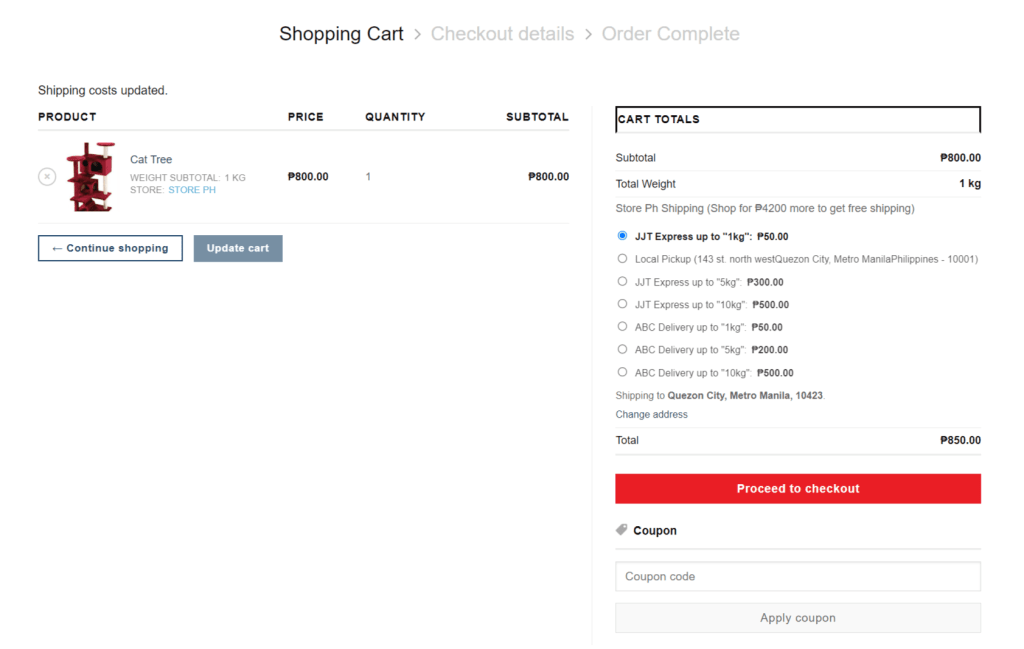
After configuring shipping, we can add shipping to the product. Based on the shipping settings in the video tutorial, this is how it appears on the cart view page.
Adding Products
To increase sales, you can easily customize and manage all of the products you want to display on your store profile. To navigate on my account, go to Store Dashboard > Products.
To learn more about adding products process and for the product types. Please visit Adding Product page.
For a more advanced tutorial on how to set up your store, including adding coupons, other store settings, and more. Please see the Store Setup page for more information.